
by Polina Yan
Someone is trying to book help on a website. They’re typing questions into a chat box, toggling to email, copying links into a video app, switching windows back and forth. It feels disjointed and slightly ridiculous — all anyone wants is to just look at each other and talk. A real conversation is faster than a thread of messages, clearer than a support article, and more personal than an FAQ page.
Businesses feel this shift. People aren’t only looking for answers; they’re looking for presence. They want to see who they’re dealing with, know they’re heard, and feel like they’re in the right hands. Which is why so many companies choose to integrate video call into website directly instead of sending users off to external platforms.
This isn’t about adding “another feature.” It’s about making the moment of contact simple, human, and direct — and building trust the second the camera turns on.
Why Businesses Are Embedding Video Calls

When someone reaches out for help, guidance, or information, they aren’t just asking for data — they’re reaching for clarity. Talking face-to-face speeds that up. A real conversation builds trust faster than chat threads, email chains, or form submissions. That’s why companies of all sizes have started to integrate video conferencing directly into their sites. It reduces friction. It turns hesitation into action.
Some fields feel the impact immediately:
- Telehealth and therapy, where tone and presence matter.
- Coaching and education, where guidance happens in the moment.
- Real estate tours, where a camera can walk someone through a space miles away.
- Product demos and sales, where understanding comes through demonstration.
- Customer support, where empathy is part of the solution.
The benefits are practical and visible:
- No switching between platforms
- A private space that aligns with the brand’s tone
- Higher conversation-to-purchase conversion
- Clients feel like they’re being taken seriously
It also changes the emotional dynamic. When someone sees your face, hears your voice, and has your attention, they relax. The whole interaction softens.
Picture this: a counselor meets a new client. Instead of a generic meeting link, the client opens a secure page on the counselor’s own site. One click. They’re there. No passcodes. No confusion. Just the two of them, present.
This is the core value of choosing to integrate video call into website: the conversation happens inside your space. Not rented from a third-party app. Not shared with random participants in a waiting room.
It feels grounded. It feels intentional. And it shows the person on the other side that you’re willing to meet them directly.
Approaches to Adding Video Calling

There isn’t just one way to place video inside a website. The right method depends on how much control you want over the experience, how fast you need to launch, and how personal the interaction should feel. Some businesses just need a simple, click-to-join call window. Others want something shaped around their workflow — scheduled sessions, login permissions, private rooms, recorded consultations, and clear identity handling.
So the choice usually comes down to two paths: something fast and lightweight, or something more customizable and long-term.
Simple Embeds (If You Need Something Fast)
The quickest way to put video inside your website is to embed video conferencing using an iframe, widget, or pre-built room link. It’s essentially the same as embedding a YouTube video — except this one is interactive.
This works well if you’re testing an idea, launching quickly, or running small sessions. You paste a short code snippet into your site, and the call window appears wherever you want it.
Pros:
- Very fast to launch
- Minimal setup
- Works even if you have limited technical skills
Cons:
- You don’t control the exact layout or styling
- The call experience may not fully match your brand
- Feature set is whatever the provider supports — no deep customization
It’s a solid way to start, especially if your priority is getting conversations happening today. But once your calls become part of your core service, you’ll likely want tighter control.
Using an API or SDK for Custom Control
APIs and SDKs allow you to build something that feels like your own.
An API provides the underlying functions — start call, end call, manage participants, handle permissions. You connect these to your server and user system.
An SDK gives you building blocks: interface components, device controls, screensharing buttons, chat panels — pieces you can arrange the way your workflow needs.
This approach fits businesses that care about:
- The flow of how a call begins and ends
- How users log in or authenticate
- Consistent brand look across every screen
- Stability under many simultaneous sessions
It also gives room to work with video quality tuning, WebRTC performance, and mobile responsiveness — so the call doesn’t freeze the moment someone switches to 4G.
You can embed video conference elements inside custom pages, or use an embed video conferencing API to connect sessions directly to your user accounts. Teams that want recurring sessions or classroom-style layouts often choose to integrate video conference SDK solutions. And when scaling across many users, video conferencing API integration keeps performance stable while giving you control.
This route asks for more thought, but the experience becomes fully yours — and that’s where things start to feel polished and intentional.
Use Cases & Industries That Benefit Most
Video calling makes the most difference in moments where tone, timing, and presence matter. Not broad categories — real, human situations.
A therapist checks in with a client who’s been having a rough week. The call opens directly inside the therapist’s site — no codes, no lobby screens. The client sees a familiar face and relaxes. This is why some professionals choose to add video conferencing to your website instead of sending people off to third-party apps. The container of the session becomes part of the care.
A language tutor has weekly lessons with students from different cities. They meet in the same branded call room every time. The whiteboard is always there. The notes remain. The environment feels stable — like a classroom that happens to live online. That consistency is what makes progress feel real.
A fitness coach leads a client through slow breathing and shoulder positioning. The client mirrors movements in real time. If the coach had to explain that through chat messages or recorded clips, it wouldn’t land the same way.
A support specialist helps someone troubleshoot something technical. They can see the person’s expression shift from frustration to relief. That emotional shift is the actual service.
If you’ve ever wondered how to add video calling to your website, the answer starts here: think of the moments where being present changes the outcome. That’s where the work feels meaningful — and where embedding video becomes more than just a feature.
Practical Considerations: UX, Privacy, Stability

Once you integrate video call into website, the way the call feels becomes as important as the call itself. A session can technically “work,” but if the user is staring at confusing pop-ups, tiny buttons, or shaky video, the atmosphere breaks. The goal is to make the call start smoothly and stay grounded.
One of the first points is the camera + microphone permission step. If the browser throws a generic permission box with no context, people hesitate. A short line like: “We’ll use your camera for the session — you can disable it anytime” removes uncertainty instantly.
Connection quality and layout shape emotional tone. The interface should stay calm, uncluttered, and steady even when bandwidth shifts. Smooth fallback (resolution adjusts instead of freezing) keeps the conversation intact.
Some features genuinely help when used with intention:
- Chat: for sending links, spelling names, clarifying short points
- Screen sharing: when explaining steps or showing visual materials
- Session notes: for tutors, therapists, or coaches who track progress
Mobile support matters too. A person holding a phone upright shouldn’t struggle to see the other person’s face. Keep controls reachable by thumb. Keep gestures simple.
Privacy needs to be visible, not assumed. People trust environments where the rules are clear:
- Calls are encrypted
- No recording happens without consent
- Data stays within the host’s system
Whether you use an SDK, a custom integration, or simply embed video call into a page, the core aim is the same: make the interaction feel natural enough that the technology disappears in the background.
Implement Turnkey Video Calling with Scrile Stream

At some point, the video calls become part of the core service — not just an add-on. When that happens, you need something that feels like it belongs to your business. Scrile Stream is built for that. It’s not a template-based meeting room or a generic conferencing app. It’s a custom development service that shapes the video experience around how you work.
You aren’t forced into someone else’s layout or workflow. You choose:
- How the interface looks — colors, layout, tone
- User roles — host, client, member, guest
- Paid session models — one-off sessions, subscriptions, packages
- Scheduling & waiting rooms — structured or flexible
- Authentication rules — private communities, client lists, team access
Everything stays inside one branded environment. No jumping to external meeting links, no “download this app first.”, no platform logos overshadowing your own identity. Your clients feel like they are entering your space, not someone else’s.
This matters most when the connection itself is part of the business — therapists, coaches, tutors, advisors, support teams, consultative sales. The video call becomes the room where trust builds.
And when you integrate video call into website using Scrile Stream, you keep ownership over your data, your users, and your revenue. The platform grows as you grow — from one-to-one sessions to group calls, private communities, or structured programs.
If the goal is to make the call feel natural, intentional, and seamlessly part of your world — Scrile Stream gives you the foundation to build exactly that.
Conclusion
Video isn’t just a function. It’s the moment two people see each other and understand what they mean. When you integrate video call into website, you keep that moment inside your own environment — not scattered across links, downloads, and third-party interfaces. The relationship lives where your brand lives.
The advantage shows up quickly: conversations feel smoother, trust builds faster, and decisions happen with less confusion. People feel taken care of when the call experience matches the tone of the service behind it.
If you want help shaping a video space that feels personal, steady, and connected to how your business actually works, talk to Scrile Stream. They build the environment to fit you — not the other way around.
Polina Yan is a Technical Writer and Product Marketing Manager, specializing in helping creators launch personalized content monetization platforms. With over five years of experience writing and promoting content, Polina covers topics such as content monetization, social media strategies, digital marketing, and online business in adult industry. Her work empowers online entrepreneurs and creators to navigate the digital world with confidence and achieve their goals.

by Polina Yan
Back in the early days of remote work, hosting a virtual event meant firing up Zoom, sending out a calendar invite, and hoping everyone showed up. But by 2025, that’s ancient history. Virtual events have become a core part of how we work, teach, promote, and connect. From small workshops with niche audiences to international symposiums featuring hundreds of speakers, the demand for professional, reliable, and feature-rich solutions has exploded.
We’re not just talking about video streams anymore. Modern virtual conference platforms offer a full ecosystem: interactive stages, live chat, networking lounges, sponsor booths, analytics dashboards, and even AI-powered recommendations. Hosting a standout online event now means delivering real engagement and value—not just replicating a meeting in digital form.
Virtual conferences aren’t just a temporary trend from the lockdown era anymore. PR and communications teams now treat online events as one of their main ways to reach audiences. As Reena Aggarwal notes in Agility PR Solutions:
Virtual events deliver faster reach, greater flexibility, and deeper impact—all this with lower costs and in minimal time.
When you’re choosing a virtual conference platform, you’re effectively choosing the infrastructure for that reach, flexibility, and impact. That’s why this comparison focuses so much on reliability, engagement tools, and how well each solution scales with your plans.
Here’s the challenge: the number of tools available has grown just as fast as the events themselves. Some are sleek and easy to use but lack customization. Others offer deep features but require technical skills or large budgets. That’s why this virtual conference platform comparison exists—to help you figure out which platforms are worth your time (and your budget), depending on the type of event you’re planning.
In this guide, we’ll walk through the 10 best virtual conference platform comparison in 2025, highlight their unique strengths, and help you narrow down what works best for your audience, goals, and team size. Whether you’re hosting a virtual summit, an educational forum, or a full-blown branded expo, the right platform can transform your event from functional to unforgettable.
What Makes a Platform Best for Hosting a Conference?

Let’s be honest: you’re not just looking for a place to throw up a Zoom link and pray for engagement. In 2025, expectations for online events are high—and attendees can spot a lazy setup from a mile away. So, what separates decent conference hosting platforms from the ones that actually make people stick around, interact, and remember your event?
First and foremost: reliability. If your keynote speaker freezes mid-sentence or the stream dies during the Q&A, it’s game over. The best platforms for virtual conferences are built to handle high traffic, international time zones, and real-time interactions—without buckling under pressure.
Then there’s flexibility. You might be planning a tight, single-track symposium with a few dozen attendees—or a sprawling virtual expo with breakout rooms, sponsor booths, and overlapping sessions. The top platforms let you scale up or down, add modules, and switch formats without rebuilding the whole thing from scratch.
Let’s talk engagement. Chat boxes are great, but they’re just the start. You want tools that mimic the spontaneous hallway conversation: live polls, virtual networking tables, direct messaging, even speed-meeting functions. If people don’t interact, they don’t stay.
Don’t forget branding. Slapping your logo on a landing page doesn’t count. You want to build an experience that reflects your identity—from the lobby design to button colors. A good platform should make your event feel like yours, not a template.
And finally: analytics. It’s not just about who showed up—it’s about how they moved through your event. What they clicked, how long they watched, where they dropped off. Smart tracking helps you understand what worked and what didn’t—and do better next time.
In short: virtual conferences platforms need more than just video. They need structure, personality, and room to grow.
Quick Comparison of the 10 Best Virtual Conference Platforms (2025)
| Platform | Best For | Key Strengths | Limitations | Pricing (est.) |
|---|
| Zoom Events | Large-scale, hybrid events | Reliability, enterprise trust, multi-track support | Limited customization, corporate feel | From $1,500/yr |
| Hopin (RingCentral Events) | Sponsor-heavy, interactive summits | Networking, expo zones, Q&A, booths | Complex dashboard, steep pricing | $800–$1,000/event |
| SpotMe | Corporate & medical conferences | Compliance, multilingual, mobile apps | Best for enterprise, less for casual events | Custom pricing |
| Webex Events (Socio) | Enterprises, global teams | Branding, scalability, gamification | Costly, enterprise-focused | Custom pricing |
| Airmeet | Community-driven workshops | Virtual tables, networking, ease of use | Less formal, fewer sponsor features | From $200/mo |
| BigMarker | Marketers & B2B lead gen | CRM/email integration, automation | Less “flashy,” more functional | $99–$500/mo |
| vFairs | Virtual expos & trade shows | 3D lobbies, booths, sponsor showcase | Steep setup, long learning curve | Custom pricing |
| HeySummit | Small, niche events | Easy to launch, simple ticketing | Not scalable for large expos | From $29/mo |
| ON24 | Enterprise marketing & demand gen | Deep analytics, CRM integrations | Expensive, steep learning | From $500/mo |
| Run The World | Casual, interactive gatherings | Mobile-first, fun, speed networking | Light on customization | From $99/mo |
1. Zoom Events
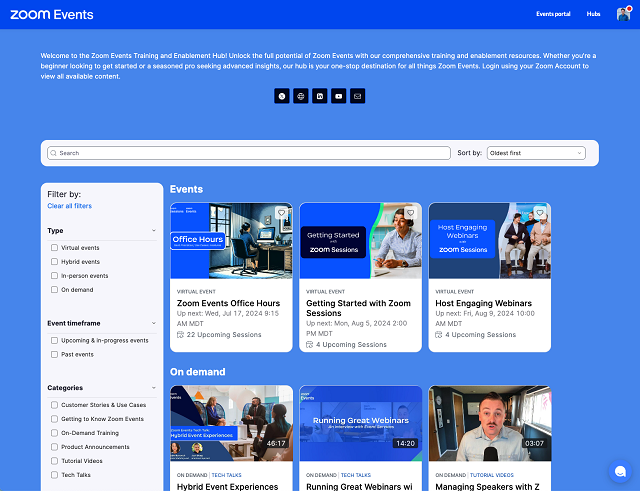
Zoom’s event platform is built for scale. It takes what people already trust from regular Zoom and expands it into a system for large, organized virtual gatherings. It’s designed to handle everything from webinars and town halls to full-scale conferences.
With support for tens of thousands of attendees, Zoom Events offers multi-track agendas, ticketing, sponsor integration, and backstage access for presenters. It’s a strong option among conference hosting platforms, especially for enterprises that already use Zoom in-house.
Where it really works is hybrid events. If you’re combining a physical venue with a remote audience, this platform offers a reliable bridge between the two.
That positioning isn’t just marketing copy. In its hybrid events research, Zoom highlights how much event teams now rely on hybrid formats to extend reach and prove ROI:
Hybrid events offer event marketers a variety of benefits that include expanding their reach to a larger audience, lower costs, and greater access to data
For organizers, that reinforces why hybrid-ready infrastructure in Zoom Events matters so much: registration flows, backstage tools, analytics, and networking all feed into a single event story. If your roadmap includes more complex hybrid conferences, that data layer becomes just as important as video quality.
Downsides? Limited customization and a UI that still feels very “corporate.” Also, it’s not cheap—plans often start around $1,500/year and scale up based on your needs.
If you’re comparing tools in a serious virtual conference platform comparison, Zoom Events deserves a spot on the shortlist—for scale and reliability alone.
2. Hopin (Now RingCentral Events)
Hopin was built for events first—making it one of the more advanced virtual conferences platforms on the market. After merging into RingCentral Events, it’s still focused on recreating the energy of in-person events, but online.
Its key strength is interactivity: live stages, virtual booths, sponsor zones, 1:1 networking tools, and audience Q&A. It’s an especially good fit for marketing summits, product launches, and fast-paced events where interaction matters.
However, all that power comes with complexity. Hopin can feel bloated if you’re running something small or simple. The dashboard takes time to learn, and pricing can quickly escalate—reports suggest it starts around $800–$1,000 per event.
If you’re shopping around for a virtual summit platforms solution with room for sponsors and audience engagement, Hopin holds up. But it’s best suited for teams that have the time (and people) to manage its advanced features.
3. SpotMe
SpotMe isn’t trying to be everything for everyone. Instead, it doubles down on what it does best: high-touch, professional events—especially in corporate, pharmaceutical, and B2B spaces. It’s trusted by Fortune 500 companies and global medical brands, and for good reason.
The platform delivers real-time audience engagement features like polls, quizzes, personalized agendas, and breakout rooms—all wrapped in a clean, brandable interface. One standout is its support for fully customizable mobile apps, letting attendees carry the full event in their pocket.
SpotMe really shines in settings that require compliance, privacy, and content control—like medical conferences and investor summits. It also supports multilingual delivery, which is essential for global audiences.
If you’re comparing tools specifically for virtual symposium platforms, SpotMe makes a strong case. It’s serious, secure, and designed to support events where the smallest detail can’t be left to chance.
4. Webex Events (formerly Socio)
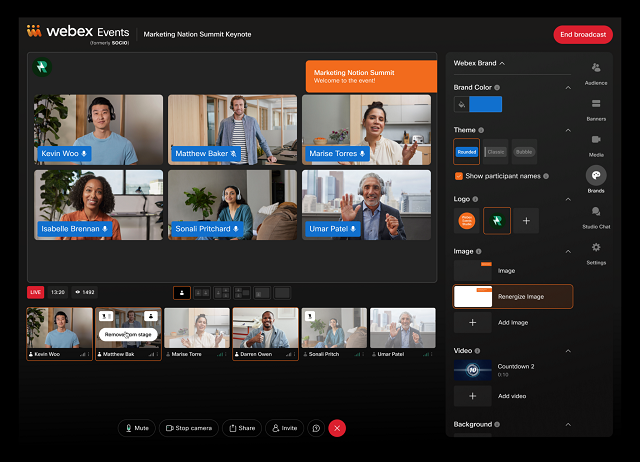
Webex Events comes from Cisco’s enterprise-grade ecosystem, and it brings that same polished feel to the event space. This is a platform built for scalability, professional branding, and complex agendas—perfect for when reliability matters more than flash.
What sets Webex Events apart in 2025 is how well it blends flexibility with structure. You can design multi-track events with detailed sponsor sections, in-depth analytics, and even gamification features—all without needing a dev team.
Custom branding is central. From pre-event pages to post-event surveys, you can shape the experience to reflect your organization’s tone and style. Sponsor booths, attendee networking, and live engagement tools round out the package.
Among the many virtual summit platforms, Webex Events holds its ground as a top-tier option—especially for enterprise organizations and global teams with complex needs. It’s not the cheapest, but it delivers on professionalism and scale.
5. Airmeet
If your event thrives on conversation, not just content, Airmeet is one to watch. Built for community-driven experiences, it emphasizes interaction over presentation. It’s ideal for workshops, education sessions, bootcamps, and any event where attendees want to meet, not just watch.
Airmeet’s virtual “tables” create space for networking, casual chats, or breakout workgroups. Speed networking, emoji reactions, and host controls make the experience feel less like a broadcast and more like a real event.
For organizers, setup is relatively easy. You can brand the event space, configure sessions, and even run ticketing without outside tools.
Among today’s virtual conference hosting services, Airmeet stands out for making events feel human—even through a screen. It’s less suited for rigid, formal conferences but shines when your audience wants to connect and collaborate.
6. BigMarker
BigMarker walks the line between webinar software and full-blown event platform. It’s ideal for marketers who want to turn webinars, demos, and online conferences into lead-generating machines.
At its core, BigMarker combines video hosting with marketing automation. You get features like built-in landing pages, email funnels, CRM integrations, and branded registration flows. That makes it a smart pick for companies running multiple small-to-medium events throughout the year.
Use cases range from training sessions to product launches and customer education events. Unlike some platforms that focus only on the attendee experience, BigMarker gives equal attention to the behind-the-scenes workflows—so your team can promote, manage, and follow up without jumping between tools.
While it may not be the flashiest on the market, it’s reliable and purpose-built for B2B marketers who need results, not just viewers. It’s a solid option in any serious virtual conference platform comparison, especially for lead-focused teams.
7. vFairs
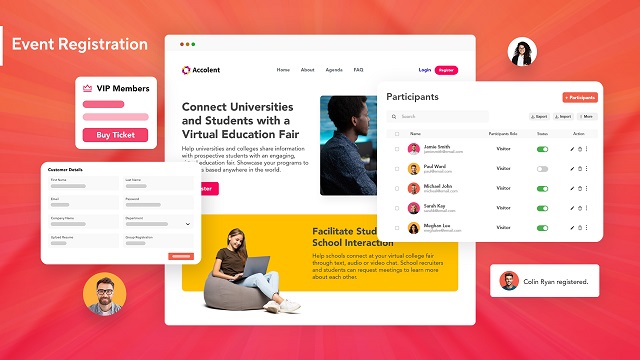
vFairs is built for virtual trade shows, expos, and career fairs—any event that relies heavily on booths, branding, and lots of concurrent conversations. It’s highly visual, with 3D lobbies, interactive exhibit halls, and customizable avatars that make the experience feel more like a digital venue than a basic webinar tool.
What sets it apart is the flexibility in design. You can replicate a branded convention center, organize content by theme, and give sponsors plenty of space to shine. Attendees can browse booths, download resources, chat with reps, and schedule follow-ups—all in one interface.
That said, it comes with complexity. Setup time is longer, and there’s a learning curve for new organizers. But if visual impact matters and your audience expects a “wow” factor, vFairs delivers.
Among conference hosting platforms, vFairs is an excellent fit for large, content-heavy events where first impressions—and sponsor impressions—really count.
8. HeySummit
HeySummit doesn’t try to be the biggest. Instead, it’s built for creators, coaches, and solo professionals running small, highly targeted online summits. If you’re running a niche event with a few guest speakers, gated content, and live or pre-recorded sessions, this platform gets the job done—without the bulk.
Its strength lies in simplicity. The interface is clean, the speaker onboarding is smooth, and it handles things like ticketing, registration pages, and session scheduling out of the box. You won’t need to patch together multiple services just to go live.
The platform is best for lightweight operations—people who care more about launching quickly and managing a focused audience than building an elaborate expo. Among virtual conferences platforms, it’s one of the easiest to start with, especially if you’re a team of one.
It won’t scale to massive multi-track summits, but for small events with clear messaging and a loyal following, HeySummit is more than enough.
9. ON24
ON24 is one of the few platforms on this list that was built with enterprise marketing in mind. It’s not just about hosting events—it’s about converting attendees into customers and nurturing those leads long after the webinar ends.
The platform excels in analytics and content lifecycle tools. It tracks how users interact with every part of your event—clicks, downloads, questions, poll responses—and rolls that data into your CRM or marketing automation system. For companies focused on demand generation, ON24 is a powerhouse.
It’s best suited for enterprises running multiple campaigns and needing clear ROI. With its branded experiences, always-on content hubs, and multi-session events, it works well for both live and on-demand events.
In virtual conference platform comparison, ON24 stands out for large organizations that need rich data, integration with existing tech stacks, and serious lead-gen capabilities.
10. Run The World
If most platforms feel like enterprise software, Run The World feels like a social app that hosts events. It’s light, fast to launch, and geared toward casual, high-energy gatherings like interactive panels, community chats, or expert roundtables.
The interface is fun, mobile-first, and made for audience participation. Features like cocktail-style speed networking, reactions, and co-hosted sessions help make virtual events feel less lonely—and more alive.
It’s especially popular among creators, thought leaders, and startups looking to run polished events without a huge learning curve. You won’t get complex sponsor zones or deep customization, but that’s not the point. Run The World delivers simplicity and interaction, not enterprise depth.
If your priority is speed, ease, and energy—and your event leans more toward conversation than keynote lectures—Run The World makes sense. It’s not for every use case, but in the right hands, it turns virtual conferences platforms into something genuinely engaging.
Need Something More Tailored? A Custom-Built Alternative from Scrile Meet
Even with all the polished platforms on the market, not every use case fits neatly into a pre-built box. For some businesses—especially those in consulting, coaching, healthcare, education, and wellness—the off-the-shelf tools feel either too bloated or too limited. They need something else: ownership, control, and the ability to build exactly what fits their audience.
That pressure to “get it exactly right” exists because virtual events are no longer side projects. As event specialists at EventBuilder put it:
In summary: They’re now a staple in the event planner’s toolkit, offering a unique blend of accessibility, engagement, and measurable results.
If virtual conferences are becoming a staple in your own toolkit, it often makes sense to own the underlying platform. That’s where a solution like Scrile Meet stands out: instead of renting generic event software, you’re investing in a branded system that can evolve with your format and business model.
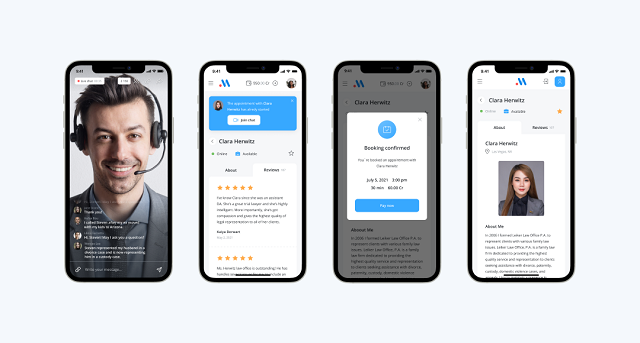
That’s where Scrile Meet steps in. Unlike most SaaS options, this is a turnkey software solution that lets you launch your own fully branded virtual consultation platform—no coding needed, and no platform commissions cutting into your revenue. You get the infrastructure, the features, and the design flexibility—all under your control.
Here’s what it includes:
- Private video calls, both one-on-one and group sessions
- Appointment booking with calendar integration
- Paid access to sessions or messaging
- A built-in admin dashboard to manage users, payments, and analytics
- Fully customizable UI/UX so your platform matches your brand from day one
There’s no need for downloads or native apps—it runs right in the browser and works across all devices. And crucially, your data stays yours. That’s a big deal in industries where privacy and control really matter.
Whether you’re a coach running premium sessions, a legal consultant managing client calls, or a niche educator looking to monetize expertise, Scrile Meet offers a way to own the platform instead of renting space on someone else’s.
It’s not another app—it’s the framework to build your own. If you’re thinking long-term, this isn’t just a smarter move—it’s a future-proof one.
Off-the-Shelf Platforms vs. Scrile Meet
| Option | Ownership | Branding | Features | Pricing Model | Weak Points |
|---|
| Zoom, Hopin, vFairs, etc. | Vendor-owned | Limited customization | Multi-track, sponsor zones | Subscription / per-event fee | Commission cuts, vendor lock-in |
| Lightweight Tools (HeySummit, Run The World) | Vendor-owned | Basic branding | Ticketing, live sessions | Low monthly fee | Limited scale, no deep customization |
| Scrile Meet (Custom Platform) | Full client ownership | 100% custom UI/UX | Video calls, booking, payments, analytics | One-time license + optional support | None — turnkey handled by Scrile |
How to Choose the Right Virtual Conference Platform
There’s no universal “best” tool—only the one that fits your goals. Before you commit to anything, ask yourself:
- Are you hosting a free event, or selling tickets?
- Will you need expo booths, sponsor zones, or just a few speakers and Q&As?
- Is branding a priority, or are you fine with a generic look?
- How tech-savvy is your team—and your audience?
This guide’s virtual conference platform comparison should help you match your needs to the right tools. Platforms like HeySummit work for lean solo events, while Hopin or vFairs cater to big-budget, multi-track expos. Meanwhile, if none of them give you full ownership or flexibility, building your own platform (like with Scrile Meet) might be the right path forward.
Conclusion
Choosing the right tool sets the tone for your entire event. With virtual conference platforms evolving fast, it’s smart to think ahead—not just about your next event, but the next five.
Test a few, ask for demos, explore what’s out there—and if nothing fits, consider building your own. A fully branded platform like Scrile Meet gives you long-term control, monetization options, and freedom from third-party limits.
Use this virtual conference platform comparison as your starting point, and create something that actually reflects your vision.
Polina Yan is a Technical Writer and Product Marketing Manager, specializing in helping creators launch personalized content monetization platforms. With over five years of experience writing and promoting content, Polina covers topics such as content monetization, social media strategies, digital marketing, and online business in adult industry. Her work empowers online entrepreneurs and creators to navigate the digital world with confidence and achieve their goals.

by Polina Yan
Imagine this: Your inbox is overflowing, chat notifications are piling up, and you’re still staring at the blinking cursor, wondering how to craft the perfect response. Now, picture an AI response generator that instantly transforms your raw thoughts into polished messages—for emails, chats, or any text-based communication.
AI response generators are not all about convenience. They are powerful tools that help businesses maintain their brand voice, speed up customer support, and turn everyday communication into a breeze for individuals. Whether you are handling business emails or juggling multiple chat conversations, these AI generators can be a game-changer in 2025.
In this article, we will look at the top AI response generators, with a focus on those that perform best in chat, email, and text applications. Get ready to discover how the right AI text response generator can streamline your workflow and elevate your communication.
What is an AI Response Generator?

An AI response generator is a smart tool designed to create quick, relevant, and context-aware replies for emails, chat messages, and other text-based communications. Think of it as a virtual assistant that doesn’t just autocomplete your thoughts but crafts entire responses, saving you time and mental energy.
These technologies work by looking at your input—a customer inquiry, an internal email, or just a plain text message—and generating a response based on advanced algorithms and machine learning algorithms. They draw on vast language pattern libraries and previous interactions to create responses not only accurate but also in tone and context you desire.
From AI chat response generators to enhance customer service chatbots to AI email response generators that compose professional emails in seconds, the uses are varied. Whether you are a company seeking to boost efficiency or an individual seeking to automate everyday communication, AI text response generators can be a game-changer for productivity.
The Benefits of Using AI Response Generators
An AI response generator can significantly boost productivity by removing guesswork in communication. Instead of spending valuable time composing emails, responding to chat messages, or typing text responses, individuals and businesses can utilize AI tools to generate professional, context-based, and relevant responses in seconds.
For companies, the benefits are clear. Imagine a customer service department using an AI chat response generator that offers appropriate replies instantly. Not only does it accelerate replies, but it also encourages response consistency. A case study illustrated a company increasing customer support effectiveness by 30% when it implemented an AI text reply generator. The AI handled repetitive questions, allowing human representatives to work on more challenging issues.
At a personal level, an AI email response generator can help deal with full inboxes, with smart recommendations making it faster and easier to reply to emails. For business or private use, text response generators offer the perfect mix of speed, precision, and simplicity, and introduce communication into everyday life rather than a hassle.
How to Choose the Best AI Response Generator

When you select an AI response generator, it’s not necessarily about getting something that spews up text. It’s about getting a solution that actually works for your workflow and communications. The proper solution can comfortably handle everything from instant chat responses to crafting beautiful email responses. Here’s what to search for:
- Accuracy. The generator should create context-specific and appropriate responses. Advanced tools utilize natural language processing (NLP) to understand not just words, but the meaning of words. This ensures that whether you’re using an AI chat response generator or an email response generator, the replies make sense and align with your messaging.
- Customization. It is critical aspect, as each brand or person has a unique voice. A good AI text response generator should allow for tone, style, and even vocabulary changes. For companies, this feature is critical to maintain brand consistency on all platforms.
- Integration. The best tools are not isolated; they integrate perfectly with your current tech stack. Whether you need an AI email response generator that works with Gmail or a message response generator for your CRM, the integration features add much value to the AI.
- Ease of Use. Sophisticated AI is great, but it shouldn’t require a PhD to operate. The interface should be intuitive, offering features like one-click response generation and the ability to tweak outputs quickly.
- Affordability. Whether you’re an enterprise with a large budget or an individual looking for a free tool, the cost-to-benefit ratio matters. Usage-based scalable pricing is offered in some tools, which can be a perfect option for growing businesses.
Tips for Different Users:
- Businesses. Look for analytics, response templates, and multi-user capabilities. These can help increase productivity, allow monitoring of communication metrics, and offer consistency across the company.
- Individuals. If you’re focused on personal productivity, a lightweight text response generator with pre-made suggestions and a straightforward interface might be ideal.
By weighing these factors carefully, you’ll find an AI response tool that not only meets but exceeds your expectations, making your communication smoother, faster, and more effective.
Top 7 AI Response Generator Tools in 2025: The Best of the Best
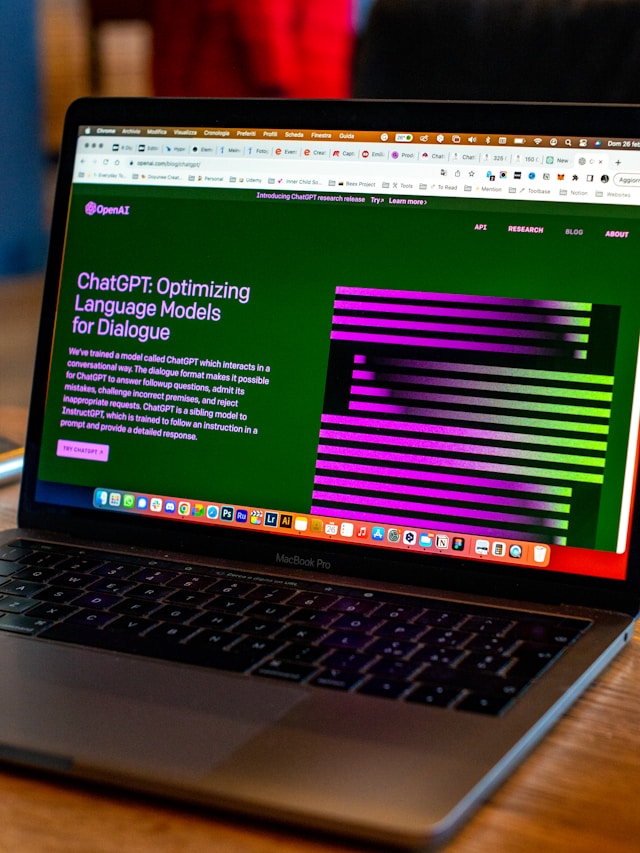
When it comes to AI response generators, the market is brimming with tools that promise to streamline your communication. But not all are created equal. Here’s a look at some of the best options available in 2025, offering everything from smart chat replies to polished email responses.
| Tool | Best For | Key Strengths | Limitations |
|---|
| ChatGPT (OpenAI) | Cross-platform use, business & personal | Human-like replies, adaptable tone, email & chat integration | Subscription needed for advanced features |
| Jasper AI | Marketing & branded messaging | Strong brand voice control, CRM/email integrations | Better for content teams than casual users |
| Writesonic | Creative & contextual replies | Witty, tone-aware responses for social & email | May require fine-tuning for formal comms |
| Scrile AI (Custom) | Businesses needing tailored tools | Fully customized style, evolving with brand, monetization-ready | Requires custom setup, not plug-and-play |
| Zoho Desk | Customer support teams | Strong integrations with Zoho suite, auto-learns from past chats | Primarily for support, less flexible elsewhere |
| Drift AI | Sales & lead generation | Conversational marketing, proactive engagement | Focused on sales rather than general use |
| Tidio AI | Small businesses & e-commerce | Simple chatbot, Shopify/WordPress ready, affordable | Limited customization & depth |
ChatGPT by OpenAI
ChatGPT is a name that has become synonymous for a reason. Powered by OpenAI’s advanced GPT-4 architecture, this is no run-of-the-mill chatbot. It can do more than just have a casual conversation. It is especially adept at writing email replies, creating social media updates, and even assisting with creative writing. ChatGPT offers a cross-platform AI chat response generator that can seamlessly integrate into various platforms, from business communication software to personal messaging apps.
Businesses typically use ChatGPT to provide automated customer support. Imagine this: immediate replies to customer inquiries, 24/7, in human-sounding responses. This application of AI reduces wait times and increases customer satisfaction. For personal use, it can help you write well-thought-out emails or provide instant replies when you’re away from your desk. The app’s ability to adapt its tone and style based on context makes it a leading contender in the AI response market.
Jasper AI
Jasper AI has held its own, particularly in content creation and marketing. While it’s perhaps most well-known for creating lengthy content, Jasper is also a great AI text response generator. That it can maintain a brand voice and create consistent messaging makes it a favorite among businesses that need fast turnaround on messaging.
Jasper AI is particularly useful for drafting email responses. For example, if a business receives repetitive queries, Jasper can generate personalized replies that save time while keeping the tone professional. The tool’s customization features allow users to fine-tune responses, which is crucial for maintaining brand identity. Jasper also supports integration with CRM and email platforms, adding a layer of convenience for business users.
Writesonic
For those who need a message response generator that blends creativity with practicality, Writesonic is a solid pick. It is designed to generate everything from witty social media replies to formal email responses. It has an exceptional ability to generate contextually relevant replies, allowing businesses to engage more deeply with their audience.
Perhaps the most impressive feature of Writesonic is its commitment to understanding user intent. Whether you’re responding to a customer complaint or writing a promotional message, Writesonic carefully examines the tone of your message and generates a response that is perfectly suited to the right tone.
Scrile AI Response Generator Solutions
Scrile offers a unique approach to AI-generated responses by providing fully customizable solutions. Unlike other tools that offer generic automation, Scrile collaborates with businesses to create AI response generators tailored to specific needs. This could mean anything from a text response generator for customer service to a bespoke AI email response generator for sales teams.
What sets Scrile apart is its adaptability. The AI doesn’t just generate responses—it learns and evolves with your brand. For instance, a business can set specific guidelines for tone and style, ensuring every message aligns perfectly with brand values. Scrile’s solution is particularly beneficial for companies needing more than just a cookie-cutter response tool. It offers a partnership approach, where businesses and Scrile’s team work together to build a system that feels like a natural extension of the brand’s voice.
Zoho Desk
Zoho Desk is a brand that is popular in customer support, and its AI chat response generator is one of the reasons it has been successful. The software is designed to integrate easily with customer support procedures, giving auto-responses that enhance efficiency and consistency. Organizations can automate routine questions, allowing human representatives to deal with more complex issues.
One of the most useful things about Zoho Desk is how well it is integrated with other Zoho tools and third-party tools, so it is a great solution for businesses that already have Zoho’s suite of tools. The AI not only generates responses but also learns from past conversations to improve accuracy over time. This is a great solution for businesses that want to build a smarter, more effective customer support system.
Drift AI
Drift AI is carefully designed for the sales and customer interaction spaces. Its AI response generator is used to help companies reach out to potential customers through chatbots and automated emails. Not a simple automation tool, Drift’s AI uses conversational marketing strategies to create leads and boost conversion rates.
For example, when a prospect comes to a website, Drift AI can initiate a conversation, provide relevant information, and guide the prospect toward a purchase. As a virtual sales assistant, it helps businesses capitalize on every chance to connect with their audience. This proactive approach sets Drift apart, particularly for businesses with a strong focus on sales-driven communication.
Tidio AI
Tidio AI is an excellent choice for small businesses that need an affordable but effective text response solution. The software is primarily chatbot-based, and that is why it is perfect for businesses that need to respond to simple customer queries without a support team.
Tidio has a very simple setup process with seamless integration with popular e-commerce platforms like Shopify and WordPress. It enables businesses to provide instant responses to customer inquiries, significantly enhancing customer experience and driving sales. While it is not as customizable as some of its competitors, its ease of use and low price make it a good option for small businesses and start-ups.
Why Scrile’s AI Response Generator Stands Out
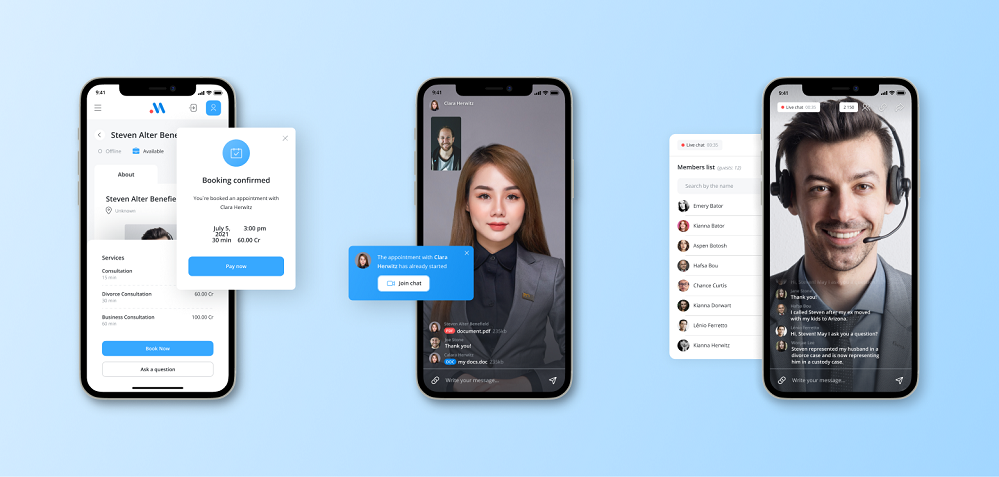
When it comes to AI response generators, Scrile takes a unique approach that goes far beyond standard automation. Instead of offering a one-size-fits-all solution, Scrile specializes in creating custom-built AI tools that match the specific communication style and needs of your business. Whether your goal is to automate customer service responses, improve sales conversations, or facilitate internal messaging, Scrile presents solutions that genuinely reflect the character of your company’s voice.
Perhaps the most impressive thing about Scrile’s AI solutions is their focus on going beyond simple automation. While other AI response generators can only generate boilerplate responses, Scrile’s technology is designed to understand the context and nuance of each conversation. As a result, your messages not only eschew the stiff tone that automation is so often criticized for—they have a personal and thoughtful feel, so that every response captures your business’s tone and values.
Scrile’s real-world adaptability is another major advantage. Unlike many static tools, Scrile’s AI evolves alongside your business. Each update or added feature enhances its response quality, keeping your communication strategies fresh and relevant. It’s like having an AI that learns and improves with every interaction, offering a dynamic experience rather than a fixed set of responses.
What truly sets Scrile apart is its personalized collaboration approach. Instead of simply providing a tool and walking away, Scrile works closely with businesses to develop AI solutions that fit like a glove. This partnership ensures that the response generator isn’t just an off-the-shelf product but a carefully crafted extension of your brand’s communication strategy.
If you’re looking for an AI text response generator that offers more than just automated replies, Scrile’s solution is worth exploring. It transforms AI-driven interactions from robotic to dynamic, providing a real competitive edge in today’s fast-paced digital landscape.
Generic Response Generators vs. Scrile AI
| Option | Voice & Branding | Adaptability | Integration | Best Fit |
|---|
| Generic Tools (ChatGPT, Jasper, etc.) | Fixed templates & tones | Limited evolution beyond updates | Broad but shallow integrations | Individuals & SMBs |
| Scrile AI (Custom Build) | Fully aligned with your brand | Learns & evolves with each interaction | Custom integrations (CRM, sales, support) | Businesses & platforms |
Conclusion
Selecting the right AI response generator can make a significant difference in productivity, communication efficiency, and brand consistency. With so many tools at your disposal, you need to pick a solution that not only provides automatic responses but also adapts to your specific needs, whether for chat, email, or overall text communication.
Of the contenders being considered, Scrile stands out as a top choice. Unlike traditional tools, Scrile offers customized AI solutions that reflect your brand’s voice and evolve as your business expands. It goes beyond simple automation; it is about creating genuine interactions that appeal to both humanity and thoughtfulness.
Are you ready to take your communication to the next level? Explore how Scrile’s AI response generator can help you save time, maintain a professional tone, and improve your interactions with customers. Discover the many ways Scrile can transform your business’s communication strategy, adding a lively and personalized touch to every message.
Polina Yan is a Technical Writer and Product Marketing Manager, specializing in helping creators launch personalized content monetization platforms. With over five years of experience writing and promoting content, Polina covers topics such as content monetization, social media strategies, digital marketing, and online business in adult industry. Her work empowers online entrepreneurs and creators to navigate the digital world with confidence and achieve their goals.

